在前面章节中,我们学会了如何开发一个简单的Web Server程序。
在本章节中,我们将会尝试着在Web Server中获取客户端提交的参数信息。
为简化示例,我们使用Query String的方式来传递请求参数。
参数示例
我们将之前的Hello World示例程序进行简单的改造:
main.go
package main

import (
    "github.com/gogf/gf/v2/frame/g"
    "github.com/gogf/gf/v2/net/ghttp"
)

func main() {
    s := g.Server()
    s.BindHandler("/", func(r *ghttp.Request) {
        r.Response.Writef(
            "Hello %s! Your Age is %d",
            r.Get("name", "unknown").String(),
            r.Get("age").Int(),
        )
    })
    s.SetPort(8000)
    s.Run()
}
在GoFrame框架中,获取参数非常便捷。在本示例中,我们通过r.Get方法获取客户端提交的参数,该方法能够获取所有HTTP Method提交的参数,
比如Query String/Form/Body等,其内部将会根据客户端提交的类型自动识别解析,比如支持自动识别参数格式例如json/xml等。该方法的定义如下:
func (r *Request) Get(key string, def ...interface{}) *gvar.Var
可以看到,Get方法接受两个参数,第一个为参数名称,第二个参数为非必须参数,表示默认值。返回结果为一个*gvar.Var对象,该对象为GoFrame框架
提供的运行时泛型对象,开发者可以根据业务场景需要将参数转换为各种类型。
执行结果
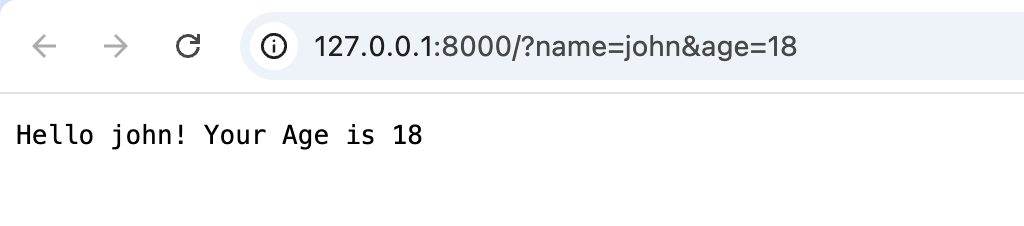
运行后,我们访问 http://127.0.0.1:8000/?name=john&age=18 可以看到,页面输出结果符合预期。
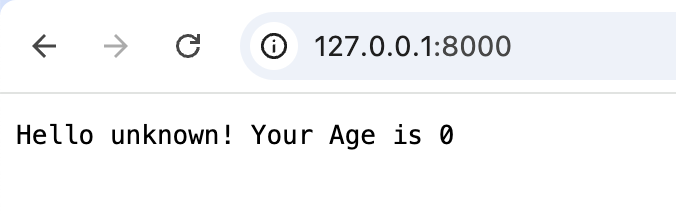
我们访问 http://127.0.0.1:8000/ 可以看到,页面输出结果同样符合预期。当未传递name参数时,程序将会使用默认值unknown,并且age参数会使用int类型的默认值0。
学习小结
在本章节中,我们学会了如何在HTTP路由函数中获取客户端提交的参数。
但大家可以看到,在本示例的代码中,存在一些显而易见的问题:
- 参数的接收使用了硬编码的参数名称,如果在真实的项目开发中,很容易由于名称拼写错误引发异常。
- 硬编码的参数名称不能确定业务含义和数据类型,很难进行长期管理维护,例如难以对参数进行描述说明、类型校验等基本操作。
在下一章节中,我们尝试通过结构化的参数对象来规避这一问题。